
Detect credential sharing, remote operators, and shadow workforce
imper.ai detects when workforce accounts are being operated by someone other than the expected employee or contractor. It evaluates the operating environment, compares relevant history, and turns material changes into impersonation risk your security policy can act on.
Known device · expected network · no remote control
Consistent environment · expected location · familiar profile
Remote control appears · location changes · device and network diverge
Choose when ongoing workforce assurance runs.
There is not one required deployment pattern. The same impersonation decision can be used at a sensitive access moment, on a recurring policy cadence, or through managed-device coverage where that model fits the environment.
Run imper.ai inside an identity, MFA, PAM, or other access workflow when the employee reaches a high-risk moment and the organization wants more confidence before continuing.
Run a point-in-time check on a schedule set by the organization when periodic re-evaluation is preferred over tying assurance to a specific user action.
For select managed-device deployments, imper.ai can also be introduced through existing MDM workflows to collect background device and operator telemetry between explicit verification events.
Each check produces one impersonation decision.
imper.ai evaluates the operating conditions around the interaction, turns combinations into impersonation-specific detections, compares relevant history when available, and produces a risk score the workflow can act on.
A new device, VPN, or location is not automatically treated as impersonation. Risk comes from detections, combinations, and material change across the signals that matter to the interaction.
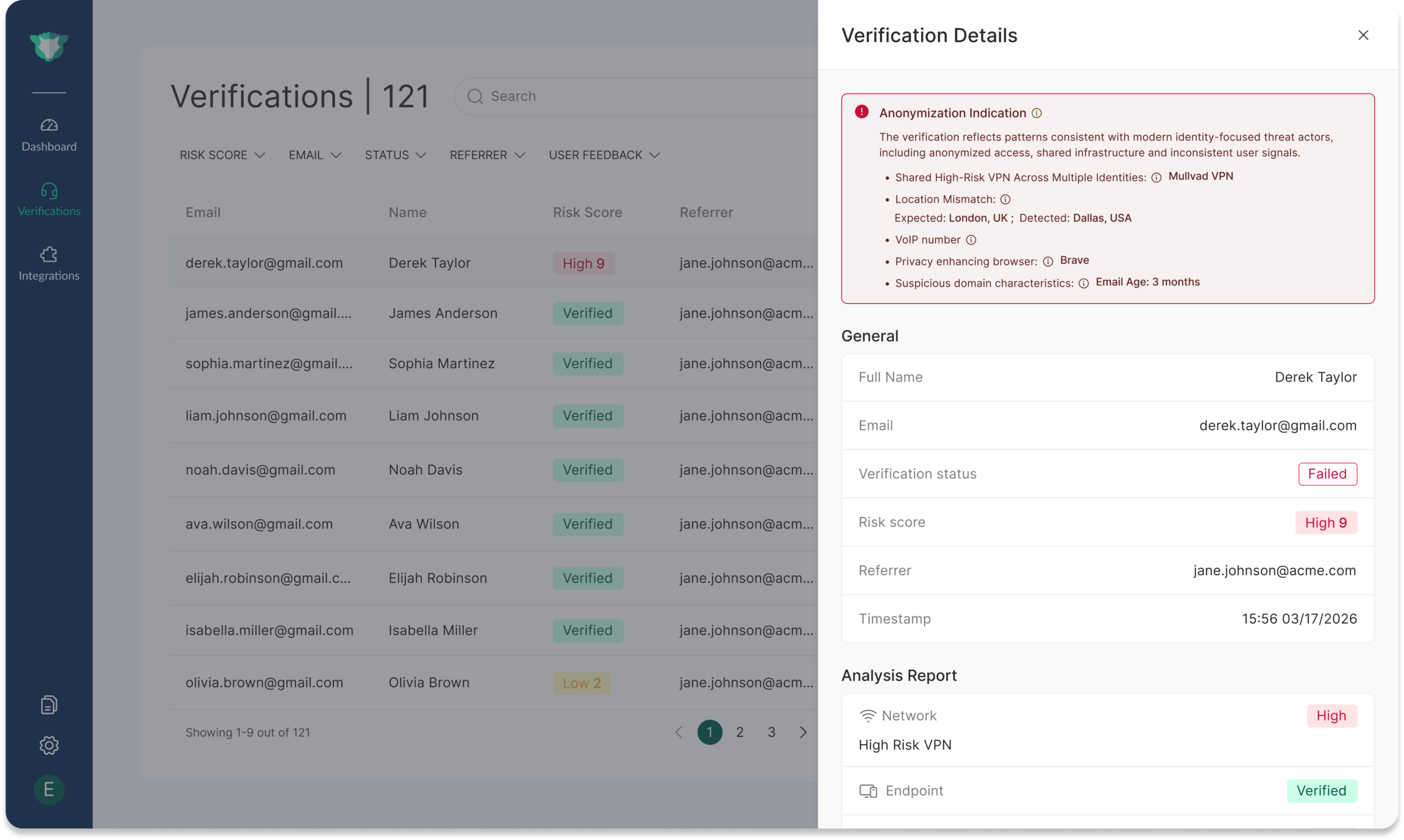
See what changed and why the interaction became risky.
Security teams can review the detections behind the decision instead of receiving a generic anomaly flag.
- Review the detections that contributed to the risk score
- See relevant device, network, environment, and continuity context
- Use the result to support the configured workflow action
What shadow workforce looks like after access has already been issued.
The account, credentials, and even the corporate device can remain legitimate while the person operating them changes.
An employee or contractor gives another person access so that person can perform some or all of the work.
Another person operates the employee’s device through remote-control tooling or infrastructure designed to hide where the work is actually being performed.
Device, network, location, environment, remote-control, or behavioral patterns change together compared with relevant prior activity.
Insider risk and shadow workforce are different problems.
Both can involve a legitimate employee account. Insider-risk controls generally evaluate what a trusted user is doing. Shadow workforce detection adds the question of whether the expected person is still the one operating the account.
The expected employee is behind the account.
Security question: What is this trusted user doing?
These controls look for unusual access, behavior, data movement, or actions performed by an authenticated identity.
The account may be legitimate, but the operator may have changed.
Security question: Is the expected person still behind this identity?
imper.ai evaluates operator, device, network, environment, remote-control, and behavioral continuity to detect that change.
The controls are complementary. imper.ai adds impersonation detection to the identity and access stack; it does not replace UEBA, insider-risk, or data-protection controls.
Laptop farms and remote-control tooling make this an ongoing workforce problem, not only a hiring problem.
Government and industry reporting on North Korean IT worker schemes repeatedly describes facilitators, laptop farms, remote-access software, and legitimate workforce credentials. Once access is issued, the security question becomes whether the expected employee is still the person operating it.
Explore the North Korean IT Worker Threat Center →Gartner tracks workforce impersonation as an emerging identity-security category.
Gartner describes Workforce Identity Impersonation Detection as technology intended to prevent attacks arising from threat actors impersonating employees, especially in social-engineering scenarios. The research also notes that approaches can include methods that do not require biometric data.
imper.ai is named as a Sample Vendor.
Explore the category →Go deeper on ongoing workforce impersonation.
See how signals, detections, correlation, risk score, policy, and workflow action fit together.
Review the systems where imper.ai can bring impersonation risk into workforce decisions.
Shadow workforce detection FAQ
What is shadow workforce?
Shadow workforce describes cases where someone other than the expected employee or contractor is performing work through a trusted workforce identity. Examples include credential sharing, undisclosed outsourcing, remote operators, and laptop-farm arrangements.
When can imper.ai run an ongoing workforce check?
The check can be placed at a login or access step-up, run on a policy-defined cadence, or used in selected managed-device deployments. The right model depends on where the organization wants additional assurance and which workflow owns the decision.
Does imper.ai continuously monitor employee activity?
imper.ai is not positioned as a generic employee-monitoring system. Ongoing workforce assurance is focused on impersonation risk and can be applied at selected interactions, on a defined cadence, or in managed-device programs where that deployment model is appropriate.
How is this different from UEBA or insider-risk tools?
UEBA and insider-risk tools generally focus on what an authenticated account is doing. imper.ai focuses on whether the account appears to still be operated by the expected person. The controls are complementary.
Does shadow workforce detection require biometrics?
No document or biometric step is required for core impersonation detection. Formal identity verification can still be used when policy requires a higher-assurance proofing event.
See how imper.ai can add ongoing workforce assurance where it matters.
Walk through the access moments, recurring checks, and workforce populations where you want more confidence that the expected person is still behind the account.